AI tools for social media graphics are helping beginner creators produce professional content faster than ever in 2026.
Keeping up with the constant demand for fresh social media graphics is one of the biggest challenges for creators, small business owners, and marketers. Every platform has its own dimensions, every audience has its own aesthetic, and every week requires new content. AI social media design tools have made that challenge dramatically more manageable — especially for beginners with no graphic design background.
The best AI graphic generator platforms do far more than produce pretty visuals. They provide thousands of platform-specific templates, automatically resize designs across formats, suggest colour palettes and fonts, and even animate graphics with one click. What used to take hours in Photoshop now takes minutes in a browser tab.
This guide covers 12 of the best beginner-friendly AI post design software options for social media in 2026 — what each one offers, why it works well for beginners, and how to use it to create scroll-stopping content consistently and quickly. For context on how visual content fits into a full creator system, see the AI influencer growth roadmap.
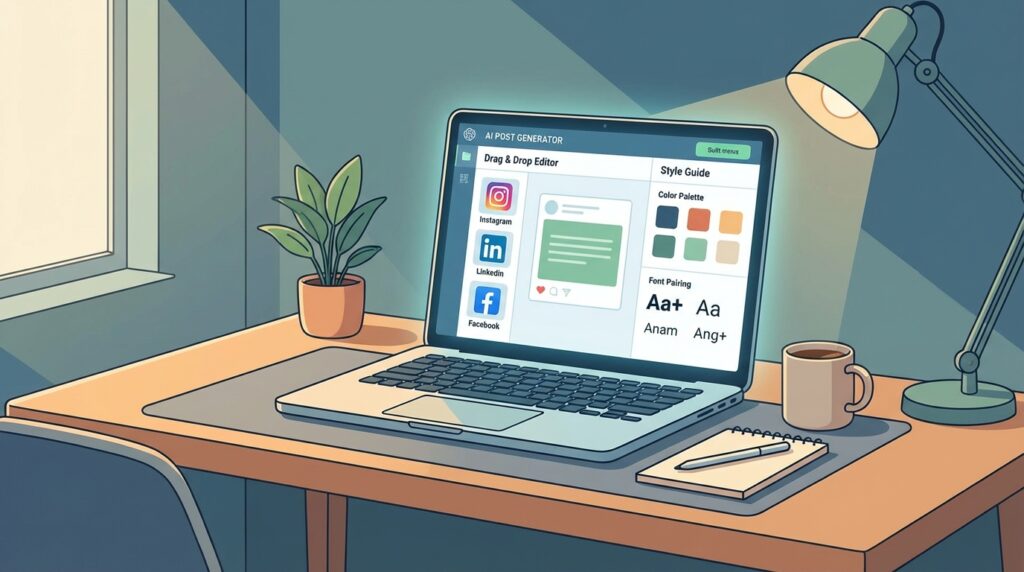
AI tools for social media graphics are software platforms that use artificial intelligence to help creators design posts, stories, and visual content quickly without advanced design skills. These tools automate layout, resizing, and styling, making it easier for beginners to produce consistent, professional-quality graphics.
What You Will Learn in This Guide
In this AI tools for social media graphics guide, you will learn:
- which tools are best for beginners
- how to create graphics faster using AI
- how to maintain brand consistency
- how to scale content production
- how to connect design with growth systems
Why AI Tools for Social Media Graphics Are Transforming Design
AI is reshaping what’s possible for beginner social media designers. AI social media design tools that previously required professional skills are now accessible to anyone, compressing the gap between idea and polished graphic to just a few minutes.
How AI Speeds Up Graphic Design
Traditional graphic design requires manually selecting fonts, building colour schemes, positioning elements, and adjusting layouts for each platform size. AI post design software automates every one of those steps.
Enter a prompt or choose a category, and the AI graphic generator produces a starting design with professional layout, typography, and colour relationships already applied. You customise from that point rather than building from scratch — cutting production time by 80% or more for most beginners.
Why Beginners Benefit from AI Design Tools
The biggest barrier for beginner social media creators has always been the distance between what they can visualise and what they can produce. AI tools for social media graphics close that gap by making professional-quality design accessible without years of software training.
Beginners also benefit from the built-in design intelligence these platforms provide. AI social media design tools won’t let you pair clashing fonts or choose illegible colour combinations the way a blank canvas would. The guardrails produce better results by default. A well-designed visual identity also supports your broader creator positioning — an AI influencer positioning strategy helps align your visual output with a consistent and recognisable brand direction.
Common Social Media Design Tasks AI Can Automate
AI post design software handles a wide range of social media graphic tasks automatically:
- Template selection based on platform, format, and content type
- Automatic resizing for Instagram, TikTok, Facebook, LinkedIn, Pinterest, and X
- Background removal from product photos and portraits
- AI image generation from text prompts
- One-click animation and transition effects
- Brand kit application — applying your colours and fonts across all templates
- Caption and copy suggestions based on the visual content
How to Use This Guide
If you are just starting:
→ Focus on simple templates
If you want faster content:
→ Use AI automation tools
If you want better results:
→ Combine multiple tools
If you want to grow:
→ Connect design with a full content system
What Makes a Good AI Tool for Social Media Graphics
Not all AI social media design tools are equally suited to content creation. The best beginner-friendly platforms share a specific set of features that make social media graphic production fast, consistent, and platform-ready.
Ready-to-Use Templates for Posts and Stories
Templates are the foundation of fast social media design. The best AI graphic generator tools offer thousands of templates organised by platform, content type, industry, and style — so you can find a relevant starting point in seconds rather than building from scratch.
Look for tools with templates specifically designed for each platform’s dimensions and best practices: square posts for Instagram, vertical formats for Reels and Stories, horizontal banners for LinkedIn and Facebook, and pin-format templates for Pinterest.
Auto-Resizing for Different Platforms
One of the biggest time drains in social media content creation is reformatting the same graphic for different platforms. A post designed for Instagram needs to be a different size for LinkedIn, Facebook, Twitter, and Pinterest.
The best AI tools for social media graphics include a one-click resize feature that automatically adapts your design to every platform format from a single source file. This feature alone can save hours of repetitive work every week.
Simple Drag-and-Drop Editing
Behind every great AI-generated template is a drag-and-drop editor that lets you customise it without needing design software skills. Look for editors where you can click any element to edit it, drag elements to reposition them, and swap images and icons with a single click.
The best AI post design software keeps the editing experience as simple as possible while giving you full creative control. Complexity and learning curves are the enemy of consistent content output for beginners.
Built-In Animations and Effects
Static graphics still work — but animated content consistently outperforms static posts across most social platforms. The best AI social media design tools include built-in animation presets that add movement to text, images, and design elements with a single click, no video editing experience required.
12 Best AI Tools for Social Media Graphics
The following tools represent the best beginner-friendly AI post design software options for social media graphics in 2026. Each has been selected for its ease of use, template quality, AI feature set, and ability to support consistent content creation at scale.
1. Canva
Canva is the most widely used AI graphic generator for social media, and for good reason. Its combination of an intuitive drag-and-drop editor, an enormous template library spanning every platform and format, and a constantly expanding AI feature set make it the natural starting point for beginners.
Canva’s AI features include Magic Design (which generates complete layouts from a text prompt), Magic Edit (which edits images using natural language), background removal, AI image generation, and a one-click resize tool that adapts any design to every social media platform.
Its free plan is generous, and the Pro plan unlocks the full AI toolkit including brand kit and content scheduling.
2. Adobe Express
Adobe Express is Adobe’s beginner-friendly AI post design software, sitting between Canva and the full Adobe Creative Cloud suite. It offers a large library of social media templates, AI-powered image generation through Firefly integration, background removal, text effects, and animated graphic options.
Adobe Express is particularly appealing for creators who might eventually move into Photoshop or Illustrator, as it introduces Adobe’s interface logic and asset ecosystem in a much more accessible way. It offers a generous free plan and a premium tier that includes full Firefly AI generation credits.
3. Simplified
Simplified is an AI-powered all-in-one content creation platform designed specifically for social media teams and solo creators. It combines a graphic design tool, an AI writing assistant, a video editor, and a social media scheduler in a single platform.
For social media graphics, Simplified’s AI graphic generator can produce complete post designs from a text prompt, resize them for multiple platforms simultaneously, and suggest caption copy to accompany the visual.
Its free plan includes generous AI credits and unlimited design creation, making it one of the strongest free options for beginners.
4. VistaCreate
VistaCreate (formerly Crello) is a strong Canva alternative with a focus on animated social media content. It offers over 70,000 templates across all social media formats and includes a large library of animated templates — graphics with built-in motion — that can be customised without any video editing knowledge.
VistaCreate’s standout feature is its extensive library of free videos, animations, and design objects. It also includes brand kit functionality and a one-click background remover. The free plan is generous, with a Pro option for unlimited storage and premium assets.
5. Designs.ai
Designs.ai is an AI-powered creative platform that combines graphic design, logo creation, video production, and social media content generation in a single subscription. Its Graphicmaker AI post design software generates social media graphics from text prompts and includes templates specifically optimised for each major platform.
Designs.ai’s AI engine produces graphics that feel more tailored than typical template-based tools. It also includes a colour palette tool and font pairing suggestions, helping beginners maintain a consistent visual identity across all their social media content.
6. Snappa
Snappa is a straightforward, no-frills AI social media design tool built specifically for social media graphics, blog images, and digital ads. Its emphasis is on speed — the platform is designed to get you from blank canvas to finished, export-ready graphic in under five minutes.
Snappa offers a curated library of over 5,000 templates, a large stock photo library, and simple editing tools. Its pre-set canvas sizes for every major social media platform mean you never have to look up image dimensions. The free plan allows three downloads per month; the Pro plan offers unlimited downloads at an affordable price.

7. Fotor
Fotor is an AI-powered photo editing and graphic design platform that combines professional image enhancement with social media graphic creation. Its AI tools include background removal, AI image generation, object removal, photo retouching, and a face beautification tool — making it particularly useful for creators whose content features product photography or portraits.
Fotor’s social media template library covers all major platforms, and its AI image enhancer automatically improves the quality of any photo used in a design. The free plan includes basic tools; the Pro plan unlocks the full AI feature set including unlimited image generation.
8. Picsart
Picsart is one of the most popular mobile-first AI graphic generator platforms, with a strong community of creators who use it for social media content. Its app is available on iOS and Android, making it the strongest option for creators who prefer to design on a smartphone rather than a desktop.
Picsart’s AI tools include background removal, AI image generation, style transfer, sticker creation, and animated GIF creation. Its template library skews toward trending social media aesthetics, making it useful for creators who want to produce content that feels current and platform-native.
9. Predis.ai
Predis.ai is a specialised AI tool built specifically for social media content creation. Unlike general AI post design software, Predis.ai focuses entirely on generating complete social media posts — including the graphic, caption, and hashtags — from a single text prompt or URL.
For beginners who struggle with coming up with fresh content ideas, Predis.ai is particularly valuable. Enter your brand name or product details and it generates a week’s worth of social media posts automatically. It supports all major platforms and includes a content calendar for scheduling.
10. RelayThat
RelayThat is a brand-focused AI social media design tool that automates the process of maintaining visual consistency across platforms. You set up your brand colours, fonts, and logo once, and RelayThat automatically applies them to every template in its library — generating hundreds of on-brand graphic variations instantly.
For small businesses and personal brands that need a high volume of consistently branded content, RelayThat is a significant time-saver. Rather than customising each template individually, you get a full library of on-brand options ready to use — particularly useful for teams managing multiple social media accounts.
11. Easil
Easil is a drag-and-drop AI post design software with a strong focus on team collaboration and brand consistency. It offers a large library of social media templates including animated options, and its layered editing interface gives more design control than many beginner-focused tools without sacrificing ease of use.
Easil’s Brand Lock feature prevents team members from accidentally modifying core brand elements like logos and colour palettes — making it particularly useful for small businesses with multiple people creating social media content. Its free plan includes basic templates; the Plus plan unlocks animated content and premium assets.
12. Piktochart
Piktochart is best known as an infographic tool, but its social media graphic capabilities make it a strong choice for creators whose content is information-dense — statistics, tips, how-to steps, and data visualisations that need to be presented attractively in a social media format.
Its templates are designed to make complex information visually clear and engaging, which sets it apart from purely aesthetic AI graphic generator tools. Piktochart’s AI features include automatic layout suggestions, smart chart generation from data, and image enhancement. It’s particularly well-suited to LinkedIn content, educational social posts, and brand thought leadership graphics.
Tools like Canva and Adobe Express are best for flexible design workflows, while Predis.ai and Simplified are better for automated content generation. Beginners often achieve the best results by combining both approaches — using a flexible editor for branded templates and an automation tool for high-volume daily posting.
How Beginners Can Create Social Media Graphics Using AI
AI tools for social media graphics make this entire process accessible to beginners — here’s a practical step-by-step workflow that works across any platform.
Many creators also produce video content and use AI tools for beginner video creators to keep their branding consistent across formats.
Using AI tools for social media graphics effectively is not just about creating visuals faster — it is about integrating them into a full content system where consistency, strategy, and analytics drive growth. Creators who build that system early compound their results across every platform they operate on. The AI influencer content strategy framework provides the strategic layer that makes visual consistency meaningful.
Choosing Templates for Posts and Stories
Start by selecting the platform and content format you’re designing for. Open your chosen AI social media design tool and filter templates by platform — Instagram post, Instagram Story, LinkedIn banner, Facebook ad — to ensure you’re working at the correct dimensions from the start.
Browse templates by style, industry, or colour scheme until you find one that aligns with your brand aesthetic. Don’t aim for perfection at this stage — choose the template that’s closest to what you need and customise from there.
Customising Colours, Fonts, and Layouts
Once you’ve chosen a template, start customisation with the two elements that have the biggest visual impact: colour and typography. Replace the template’s default colours with your brand colours, and swap the fonts for your brand’s typefaces if the tool supports custom fonts.
Then update the placeholder text with your own copy, replace any stock images with your own photos or AI-generated images, and adjust the layout if necessary. Most customisation work takes under five minutes per design once you’re familiar with your chosen tool’s editor.
Auto-Resizing Graphics for Multiple Platforms
Once your design is complete for one platform, use the auto-resize feature to generate versions for every other platform you post on. In Canva and many other AI graphic generator tools, this produces a copy of your design at the correct dimensions for each platform with a single click.
Review each resized version for any layout issues — text that has been cut off, images that no longer fit the frame, or elements that have been repositioned. Make small adjustments where needed, then export all versions together.
Adding Animations and Visual Effects
For platforms where animated content performs well — Instagram, TikTok, LinkedIn — add motion to your design before exporting. Most AI post design software offers animation presets that apply movement to the entire design or individual elements with a single click.
Choose animations that complement your content style. Subtle fade or slide transitions work well for professional and educational content. More energetic animations suit promotional, product, or entertainment-focused posts.
If you’re also creating video content to complement your social media graphics, AI tools can power that workflow too. For a full breakdown of the best platforms for editing, captioning, and repurposing video, see our guide to AI tools for beginner video creators, which covers the leading tools for producing short-form and long-form video content in 2026.

Tips for Designing Better Social Media Graphics
Having access to great AI social media design tools is only part of the equation. These practical design principles will help you produce graphics that stand out in crowded feeds and drive genuine engagement.
Keep Designs Simple and Readable
The most common mistake beginners make with social media graphics is over-designing. Too many elements, too much text, and too many colours compete for attention and make graphics harder to read in a fast-scrolling feed.
Aim for one clear focal point per graphic — one image, one headline, one call to action. White space is not wasted space. Clean, uncluttered designs communicate more effectively and look more professional than busy layouts.
Use Consistent Brand Colours
Consistent use of brand colours is one of the most powerful tools for building a recognisable social media presence. When your audience sees your colour palette in their feed, they should be able to identify your brand before they read a single word.
Use your AI post design software’s brand kit feature to save your primary, secondary, and accent colours. Apply them consistently across every graphic you produce. Over time, colour consistency builds brand recognition that no single viral post can achieve.
A consistent visual system is also the foundation of a scalable AI influencer growth system — brand recognition across platforms compounds over time and reduces the effort needed to attract new audiences.
Focus on Visual Hierarchy
Visual hierarchy is the principle that guides the viewer’s eye through a design in the intended order. In a social media graphic, hierarchy usually means: headline first, supporting image second, call to action or brand element third.
Use size, weight, and colour contrast to establish this hierarchy. The most important element should be the largest and most visually prominent. AI graphic generator templates handle this automatically — study them to understand how hierarchy works, then apply it to your own customisations.
Test Different Formats for Engagement
Different content formats perform differently depending on your platform, audience, and industry. Carousel posts drive higher engagement on Instagram. Single-image posts with strong headlines perform well on LinkedIn. Animated content outperforms static on most platforms.
Use your AI tools for social media graphics to create the same content in multiple formats and test which performs best with your audience. Analysing AI influencer performance metrics gives you the data to identify which graphic formats drive the most engagement and refine your visual strategy accordingly.
Frequently Asked Questions
Here are answers to the most common questions beginners have about AI tools for social media graphics.
What Are the Best AI Tools for Social Media Graphics?
The best tool depends on your specific needs. For the most complete all-in-one platform, Canva leads the field for beginners. For mobile-first creators, Picsart is the strongest option. For automated brand consistency, RelayThat stands out. For information-dense content, Piktochart is the specialist choice. For all-in-one AI post design software with scheduling, Simplified is a strong free option.
Are There Free AI Tools for Social Media Design?
Yes — many of the best AI social media design tools offer meaningful free plans:
- Canva — free plan with thousands of templates and basic AI features
- Simplified — free plan with generous AI credits and unlimited designs
- VistaCreate — free plan with animated templates and premium assets
- Adobe Express — free plan with Firefly AI generation credits
- Snappa — free plan with three downloads per month
- Picsart — free plan with core design and AI editing features
Can AI Create Graphics Automatically?
Yes. AI graphic generator tools like Predis.ai and Simplified can generate complete social media graphics — including layout, imagery, and copy — from a single text prompt or URL. Canva’s Magic Design feature does the same within its platform.
While AI-generated graphics benefit from human review and minor customisation, the quality of automatic generation in 2026 is high enough that many beginners use AI-generated designs as finished posts with minimal editing.
Which AI Graphic Tool Is Easiest for Beginners?
Canva is consistently rated the easiest AI social media design tool for beginners due to its intuitive drag-and-drop interface, guided AI features, and extensive template library. Adobe Express is a close second.
For absolute beginners who want the most hands-off experience possible, Predis.ai generates complete posts automatically from a prompt — requiring the least design input of any tool in this list.
Start Creating Better Social Media Graphics Today
AI has fundamentally changed what’s possible for beginner social media creators. In 2026, producing professional-quality graphics consistently — across multiple platforms, multiple formats, and multiple posting days every week — is entirely achievable without a design background or a significant budget.
AI tools for social media graphics give every beginner the same production capabilities that marketing teams once needed expensive software and specialist staff to achieve.
The right tool depends on where you create, what you create, and how much automation you want. Start with Canva if you want the most complete all-in-one platform. Choose Simplified if you want AI post design software with scheduling in one place for free. Try RelayThat if brand consistency across a high volume of posts is your priority. Use Predis.ai if you want an AI graphic generator to handle complete post creation with minimal input.
Consistent social media graphics production directly impacts monetisation opportunities such as brand deals, affiliate marketing, and digital products. Creators who build a reliable visual output system are better positioned to execute a full AI influencer monetization strategy as their audience grows.
As your presence scales, understanding what drives how to become an AI influencer helps you connect your design output to a full growth architecture — not just individual posts, but a compounding system of content, audience, and income.
Consistency is what builds a social media following. AI tools make consistency achievable for everyone — regardless of design experience, team size, or budget. Learning how to use AI tools for social media graphics effectively is one of the first steps toward building a scalable content system and long-term online income.